Logitech C925-e Webcam with HD Video and Built-In Stereo Microphones
Our #1 choice is
Our #1 choice is
Taking snaps of food has become a huge part of both commercial and personal photography. Whether you’re a professional shooter looking to broaden your skill set, or someone starting a business in the food industry finding a camera to shoot food well can be a difficult task to initially navigate.
We aim in this list to cover a wide range of cameras for a variety of budgets and skill sets to cover the best options for everyone. Regardless of your skill set or level of exposure, its worth finding a good camera that suits your need from the outset.
Food is a challenging subject to shoot whether you’re a skilled photography or a beginner so having the right camera to begin with is vital in making your life that bit easier before you set out shooting.
Read our list and see which camera is right for you. We will be sure to cover something for everyone so read on and find the perfect camera for you and your food shooting ventures.

[su_button url=”https://amzn.to/2VSujwN” target=”blank” background=”#ef2d35″ size=”8″ center=”yes” onclick=”trackOutboundLink(‘amazon’); clicky.goal( ‘119507’, null, 1 ); clicky.pause( 500 );” rel=”nofollow”]View Prices![/su_button]
The Sony A7 III is our choice for the best all round food photography camera. Whilst this camera has a staggeringly high price for those that are working on a budget, or even those that don’t want a commercial shooting camera – for those that want the best option on the market as of now, the Sony A7 III is almost impossible to beat.
This camera boasts amazing high resolution images thanks to its 24 megapixel sensor. The image quality this camera is capable of capturing is remarkable given the price range. The full LCD touch screen is another feature that will leave users happy.
The autofocus on this camera is one of the best ever, the camera is capable fo capturing extremely high levels of contrast in images which is particularly attractive for food photographers. It also shoots extremely well in low level light, and on top of this with a cheap adapter you can add any lenses to this camera.
For what many consider a basic full bodied camera, the Sony A7 III is truly a remarkable camera that is perfect for food photography and uses beyond.
[su_button url=”https://amzn.to/2VSujwN” target=”blank” background=”#ef2d35″ size=”8″ center=”yes” onclick=”trackOutboundLink(‘amazon’); clicky.goal( ‘119507’, null, 1 ); clicky.pause( 500 );” rel=”nofollow”]View Prices![/su_button]
[su_button url=”https://amzn.to/2YhEsEV” target=”blank” background=”#ef2d35″ size=”8″ center=”yes” onclick=”trackOutboundLink(‘amazon’); clicky.goal( ‘119507’, null, 1 ); clicky.pause( 500 );” rel=”nofollow”]View Prices![/su_button]
The Olympus OM-D E-M10 Mark III camera is our choice for the best value camera for food photography. All things considered for under 500 dollars this camera is an excellent option for those wanting a camera that will take great shots of food.
The ergonomically designed body that Olympus have used to create this camera is perfect for long days of shooting, as with Olympus products the build quality and overall functionality is great. This camera has plenty of good features too, such as its ability to save images as j.peg’s, RAW files and easily transfer shots with the built in WiFi function.
It also shoots in 4K video which is fantastic for anyone wanting to shoot videos as well, boasts a 16 megapixel sensor comes with a built in autofocus and a fantastic ISO range that will suit bloggers, social media users and more.
[su_button url=”https://amzn.to/2YhEsEV” target=”blank” background=”#ef2d35″ size=”8″ center=”yes” onclick=”trackOutboundLink(‘amazon’); clicky.goal( ‘119507’, null, 1 ); clicky.pause( 500 );” rel=”nofollow”]View Prices![/su_button]
The Canon EOS5D Mark IV is a full frame digital SLR camera is one of the most in demand cameras for still life shooters around the world. This camera is a favourite amongst food photographers alike and has a reputation for being the most professionally astute model for this genre of shooting.
As with most still life camera that exceed there potential this cameras main draw is the fact that it has a amazing autofocus capable of detecting and generating a variety of contrasts within your shots.
The 61 autofocusing functionality of this camera make it a great choice for food photographers, this model is an updated version of previous models and the new built in real time autofocusing is an another step in exploring new shooting techniques with this camera. Overall this is an excellent choice for professional quality image taking.
The Canon Digital SLR camera is our choice for the ultimate beginner camera. This camera is extremely easy to use and perfect for those that are wanting a camera for non professional use.
This camera is simple to use whilst also taking extremely high quality images. Perfect for bloggers, social media addicts or anyone wanting to share snaps quickly – this camera has full WiFi’s connectivity, as well as a burst shooting feature that means you’ll never miss a shot.
Perfect for the beginner or someone who wants a more budget option camera that’ll still take great shots.
The Nikon D3400 w/AF-P DX Nikkor 18-55mm camera is another great option for the aspiring food photographer out there.
This is a great budget all round camera for those that are learning photography, want a basic food shooting camera or just want a reliable camera. The battery life is surprisingly good, the camera functions in two basic modes manual and semi-automatic. Both function well and extremely easy to use.
This camera is really lightweight which is a pleasant surprise as well as being able to shoot consistently well. Users are extremely happy with this camera and praise it for the great shooting abilities it has on such a comparatively low price.
The Canon PowerShot G9 X Mark II Compact Digital Camera is the last Camera that will feature on our list. This is another great versatile budget option for users out there wanting an all round camera that will offer both great value and high levels of functionality.
The camera has a quirky aesthetic, whilst containing a range of amazing built in features. The autofocus is extremely great considering the price of the camera. The high resolution shooting ability is impressive, whilst built in features such as face detection make this an outstanding choice for shooters.
Consider this camera if you’re looking for plenty of built in features on a budget. Great value for money this camera will offer users a great shooting experience.
This list has hopefully provided wannabe food photographers with a list of all the best cameras on the market right now. We took everything ranging from price, ease of use to versatility into consideration when curating this list.
We hope that you have found the right camera for you!
The best 4k 60 fps cameras combine the ability to shoot stunning high resolution video footage at a super fast frame rate with an array of other pro-level camera features. And although the number of cameras offering 4K 60 fps capabilities still remain relatively few today, there’s thankfully at least one truly good option at every price point – from enthusiast through to fully professional. Read our guide to the best 4K 60 fps cameras for 2024 to get the full lowdown on these exciting new tools for videographers and photographers alike.
What the best 4k 60 fps cameras for 2024 all have in common is a winning combination of videomaking features, while providing excellent value for money at their particular price point. Nonetheless, some 4K 60 fps cameras will be better suited to certain styles of shooting than others. So here we offer a number of different recommended products according to usage.

[su_button url=”https://amzn.to/2OVouLc” target=”blank” background=”#ef2d35″ size=”6″ center=”yes” onclick=”trackOutboundLink(‘amazon’); clicky.goal( ‘119507’, null, 1 ); clicky.pause( 500 );” rel=”nofollow”]View Prices![/su_button]
The Blackmagic Pocket Cinema Camera 4K is undoubtedly one of the most talked-about moviemaking releases of the last few years. And rightly so: this is a serious tool, for serious videographers. However, this last line should be taken both as praise and as a word of warning; the BPCC4 is undoubtedly an incredible camera, but in order to get the most out of it, you really need to know what you are doing.
To be sure, you’ll find no beginner’s auto modes here. Still, for those with a modicum of technical knowledge and experience, operation is extremely straightforward and intuitive. And of course, the advantage of all-manual operation is that the user retains full control over the final results. Which, it must be said, are totally stunning when the camera is placed in the right hands.
The only major drawbacks to the BPCC4 are its autofocus system – which is not truly continuous, but tap-only, via the LCD – and shockingly poor battery performance; expect around 30-40 mins of shooting time from a full charge. Oh, and of course, the fact that the sensor is not quite full frame. Nonetheless, image quality is stunning, and shallow depth of field can still be achieved by using fast lenses.
Combining superb dynamic range, excellent low-light performance, and fantastic image quality, not only is the BPCC4 our choice as the overall best 4k 60 fps camera currently available, but easily one of the best cameras for cinematography out there right now. Period.
+ Great dynamic range
+ Good low-light performance
+ Beautiful sharp 5 inch 1920 x 1080 full-HD touch display
+ Amazing price
+ Highly responsive LCD controls
+ Full-size HDMI port
+ Very good internal mics
+ Mic In and Headphone Monitoring jacks
+ Offers an incredible range of supported codecs and formats, including RAW, 12-bit video
– Poor battery life, so you’ll need to stock up on a lot of spares or invest in the separately available Battery Grip
– Non-tilt LCD that can sometimes be difficult to view in bright sunlight
– No viewfinder
– Body design and layout is less well-suited to those with small hands
– No built-in image stabilization, although can be used with stabilized lenses
– 4/3 sensor, slightly smaller than a full-frame camera
– Some users have reported loose battery doors as being a design issue
– Not great for taking still photos.
– Lackluster autofocus performance
[su_button url=”https://amzn.to/2OVouLc” target=”blank” background=”#ef2d35″ size=”6″ center=”yes” onclick=”trackOutboundLink(‘amazon’); clicky.goal( ‘119507’, null, 1 ); clicky.pause( 500 );” rel=”nofollow”]View Prices![/su_button]
[su_button url=”https://amzn.to/31TNiIJ” target=”blank” background=”#ef2d35″ size=”6″ center=”yes” onclick=”trackOutboundLink(‘amazon’); clicky.goal( ‘119507’, null, 1 ); clicky.pause( 500 );” rel=”nofollow”]View Prices![/su_button]
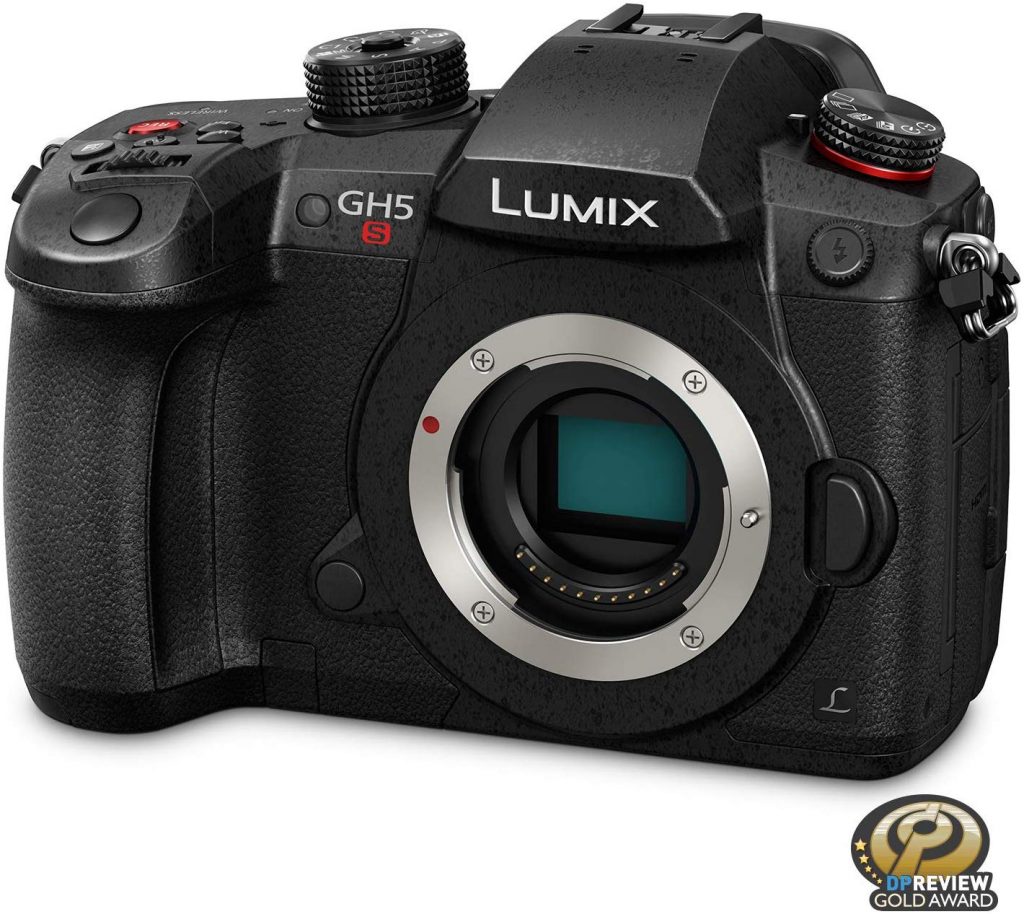
Those in need of small, compact camera that punches well above its weight in terms of video quality need look no further than the Panasonic Lumix DC GH5S. A high-bitrate and high bit-depth camera capable of producing 4K video at 60 fps. The result is probably the nicest looking footage of any similarly-specced camera available right now.
Not only this, but the GH5S is undoubtedly one of the most video-oriented photo cameras on the market. In part this is because Panasonic has evidently put a lot of thought and effort into designing a camera that’s supremely well-suited to shooting video. However, if we’re totally honest, it’s also because certain limitations make the camera a particularly bad choice for shooting stills.
Indeed, anyone hoping that this would be their go-to camera for both movie and stills shooting would likely do better to consider the GH5S’s predecessor, the GH5 (see below), with its higher pixel count and built-in image stabilization. For the most part, though, the GH5S improves on the already great performance of the GH5, offering much better low light capabilities and reduced noise at higher ISOs.
+ Best video quality from a small format camera
+ Excellent low-light performance (improved over the GH5)
+ Impressive dynamic range
+ Full HD 240 fps for incredible slo-mo (not available for 4K)
+ Big, high resolution viewfinder
– Worse stills resolution than the GH5
– No image stabilization
– Poor AF
– Inconveneient joystick controls
[su_button url=”https://amzn.to/31TNiIJ” target=”blank” background=”#ef2d35″ size=”6″ center=”yes” onclick=”trackOutboundLink(‘amazon’); clicky.goal( ‘119507’, null, 1 ); clicky.pause( 500 );” rel=”nofollow”]View Prices![/su_button]
[su_button url=”https://amzn.to/2StUWFn” target=”blank” background=”#ef2d35″ size=”6″ center=”yes” onclick=”trackOutboundLink(‘amazon’); clicky.goal( ‘119507’, null, 1 ); clicky.pause( 500 );” rel=”nofollow”]View Prices![/su_button]
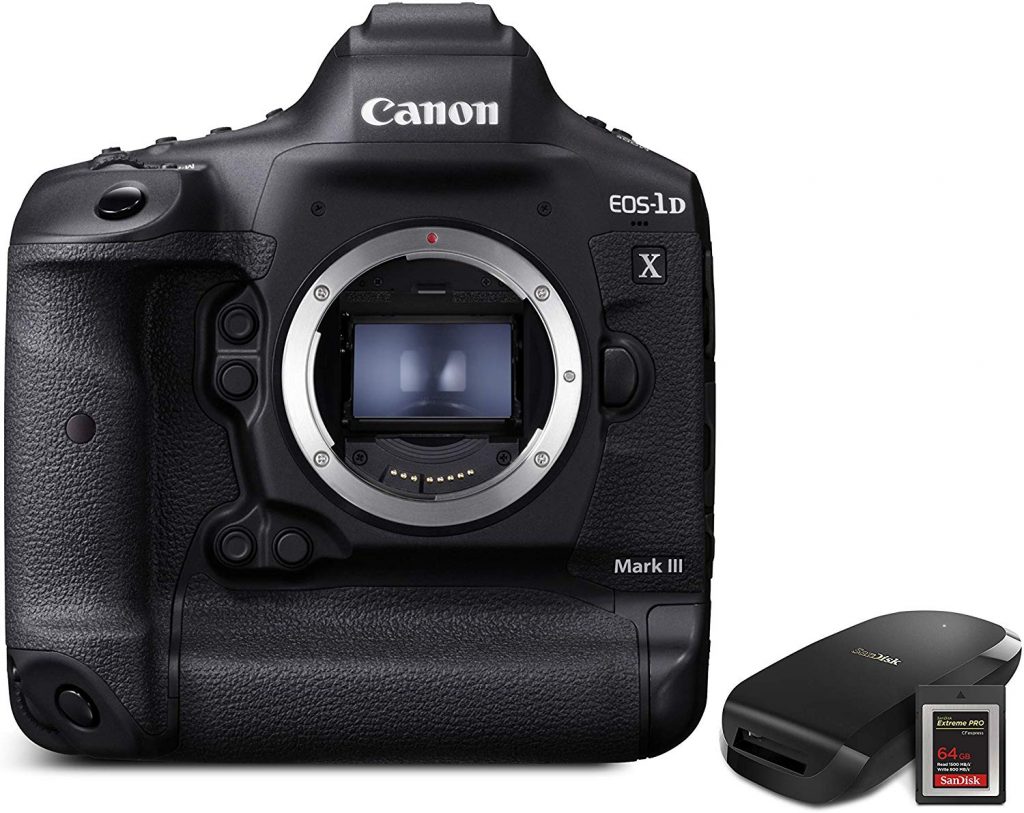
Canon’s EOS-1DX Mark III is undoubtedly the best 4K 60 fps camera out there for those who need both top quality stills and video performance in a single pro-level DSLR. Physically, the 1DX Mk III is a big, heavy tank of a camera; attesting to the wealth of power and features this formidable machine packs inside. Nonetheless, despite the brawny mass, for those who enjoy the SLR format it’s a highly usable film making tool.
Battery life is extremely impressive, and twin SD card slots mean you can keep on shooting for even longer without interruption. Face- and eye-detect autofocus work really well, and overall it offers the best focusing chops of any Canon camera out there – both through the optical viewfinder and on the LCD – making it a great tool for action stills photography.
For those who frequently shoot both movies and photographs, there’s the additional advantage that the video and stills functions are kept totally separate; meaning that you can quickly switch between the two without losing your exposure settings each time. Internal RAW recording ups the appeal for filmmakers, as does the fact that the Mk III’s audio preamps are much better than on Canon’s older cameras.
Of course, the big news here is that although the 1DX Mk III offers the same high pixel-count as its predecessor, it comes with a new processor; allowing for 4K video at 60 fps using the whole sensor. The only caveat here being that 4K 60 fps works only with manual focus, as dual pixel focusing is available only up to 30 fps.
True, some will complain about the lack of an articulating LCD. And there’s no optical in-body stabilization either (there’s electronic stabilization, but as this comes with a major loss in image quality due to cropping, you would do better to use a gimbal instead). For most photographers and film makers though, these will be no more than minor irritants that do little to detract from the 1DX Mk III’s main selling points: amazing 4K 60 fps image quality; truly great low light performance; and unparalleled autofocus for stills shooting.
One of the very latest additions to the Canon line-up, the EOS-1DX Mark III will be released mid-February 2024 and is currently on pre-order.
+ 20MP full-frame sensor
+ Amazing 191-point face and eye AF
+ Dual Pixel AF in live view mode
+ Backlit buttons
+ High-res touchscreen
+ Ruggedly built and weather sealed
+ Wi-Fi, Bluetooth and GPS
+ Dual SD card slots
+ Great in low light
– LCD non-articulating
– 4k 60 fps is manual focus only
– No optical image stabilization
– Very expensive
[su_button url=”https://amzn.to/2StUWFn” target=”blank” background=”#ef2d35″ size=”6″ center=”yes” onclick=”trackOutboundLink(‘amazon’); clicky.goal( ‘119507’, null, 1 ); clicky.pause( 500 );” rel=”nofollow”]View Prices![/su_button]
[su_button url=”https://amzn.to/2H3CGxp” target=”blank” background=”#ef2d35″ size=”6″ center=”yes” onclick=”trackOutboundLink(‘amazon’); clicky.goal( ‘119507’, null, 1 ); clicky.pause( 500 );” rel=”nofollow”]View Prices![/su_button]
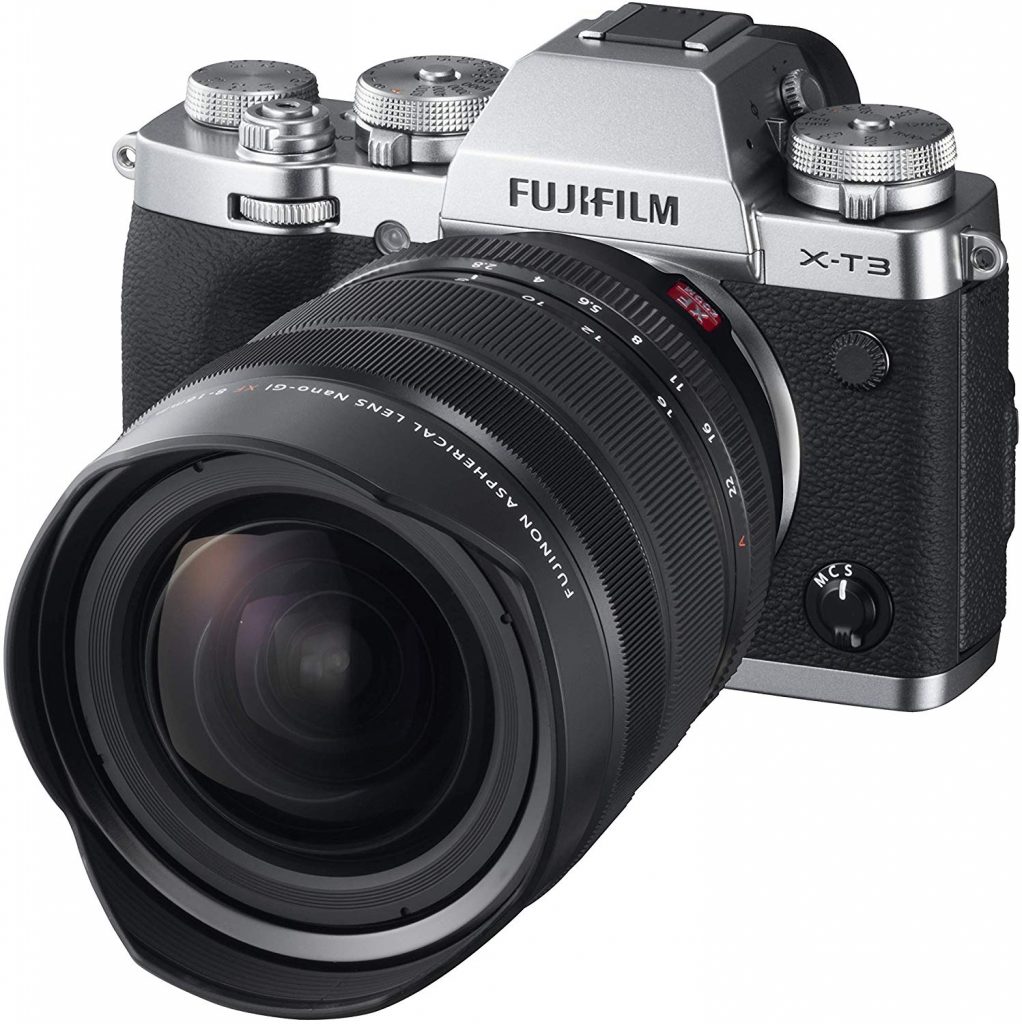
Fuji’s X-T2 was already something of a cult camera among street photographers and hipsters alike, so there was little surprise at the degree of excitement that greeted the announcement of the X-T3’s arrival in mid 2018. But beyond the pretty retro exterior, does the X-T3 actually live up to the hype?
Well, in certain respects (that we’ll get to in a second), the X-T3 actually performs worse than the X-T2. However, these minor issues aside, the real draw here for videographers is that the X-T3 trumps its predecessor’s 4K capabilities by upping the maximum frame rate from 30 to 60 fps.
What else is on offer here? For a start there’s incredible autofocus, with eye detect AF working particularly well – even on very fast moving subjects. Also, rolling shutter is barely detectable, making it a great for handheld work and panning shots. And there’s a top quality onboard pre-amp, which means that recording audio direct to camera is very satisfying indeed. You also benefit from Fuji’s famous color rendering, meaning that images tend to look great straight out of camera.
What’s more, the X-T3’s EVF is absolutely fantastic. And with the 60 fps 4K, the Fuji is capable of very impressive slo-mo sequences at an incredible resolution. Additionally, one very handy feature is the ability to set up your video exposure settings (for example, a nice slow shutter speed) via the touch screen without changing your stills shooting settings o the dials. This makes it very quick and easy to switch between shooting movies and stills.
Of course, while the X-T3 easily ranks among the best 4K 60 fps cameras available right now, it needs to be remembered that it comes with an APS-C sensor, not a full frame one. Bear in mind, too, that there’s no in-body image stabilization on offer here.
And how does the X-T3 compare to its predecessor? Well, while the X-T3’s dynamic range somewhat outdoes the X-T2 at lower ISOs, performance is actually slightly less impressive than the X-T2 when the camera is used at higher ISO settings. Nonetheless, the X-T3’s hybrid AF phase detect system means that autofocus performs much better in low light than on the X-T2. And this, coupled with the touch of extra resolution offered by the newer model, ultimately makes for a pretty good trade off.
Finally, with the X-T4 rumored to be on its way very shortly, prices for the X-T3 are likely to fall soon, which would only make it even more of a bargain.
+ Amazing eye-detect autofocus
+ AF performs very well in low light
+ 26MP CMOS sensor
+ Great hands-on controls
+ Fast burst rate
+ Good battery performance
+ Very nice viewfinder
+ Good onboard audio preamps
+ Fuji color profiles
– Not full frame
– No onboard optical image stabilization
– Lacks non-face subject tracking when shooting video
[su_button url=”https://amzn.to/2H3CGxp” target=”blank” background=”#ef2d35″ size=”6″ center=”yes” onclick=”trackOutboundLink(‘amazon’); clicky.goal( ‘119507’, null, 1 ); clicky.pause( 500 );” rel=”nofollow”]View Prices![/su_button]
[su_button url=”https://amzn.to/3bgqZkG” target=”blank” background=”#ef2d35″ size=”6″ center=”yes” onclick=”trackOutboundLink(‘amazon’); clicky.goal( ‘119507’, null, 1 ); clicky.pause( 500 );” rel=”nofollow”]View Prices![/su_button]
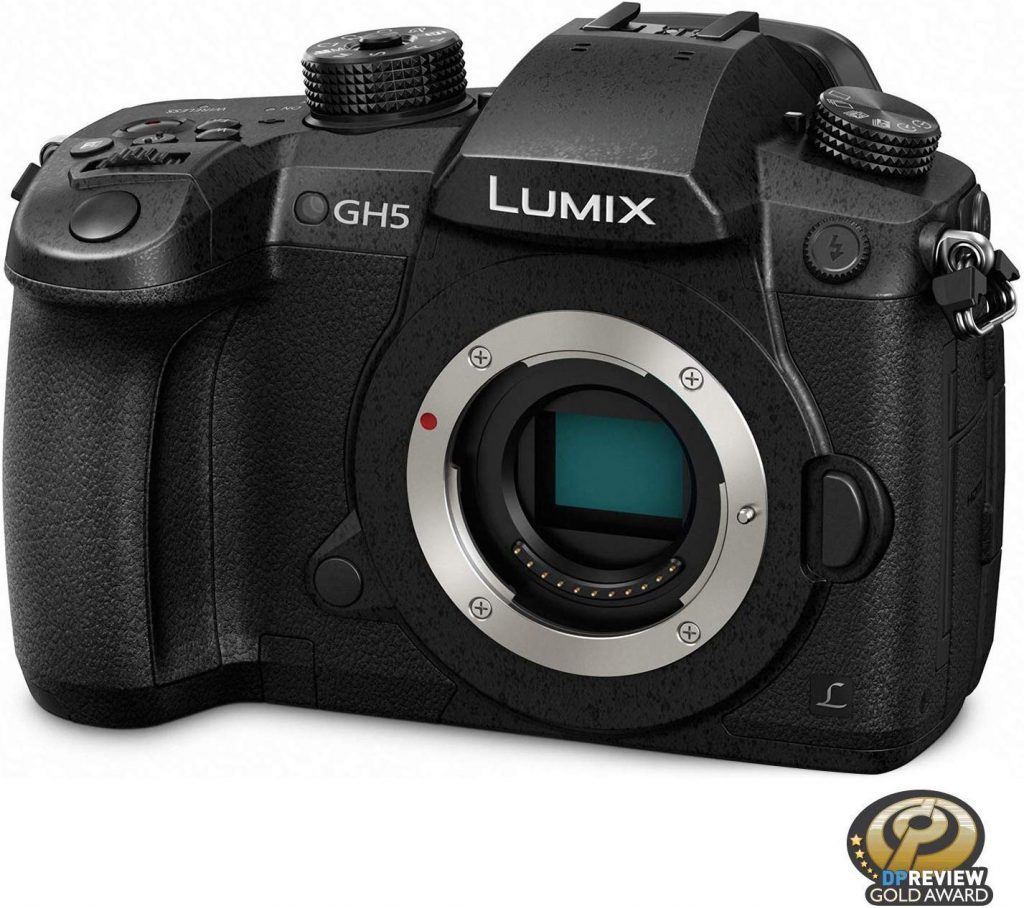
For those in need of a small, lightweight camera for shooting both movies and stills – and who are discouraged by the GH5S’s emphasis on the former to the detriment of the latter – the only marginally older Lumix GH5 might be just what you’re looking for.
As an early adopter of 4K 60 fps, Panasonic’s GH5 already came with this capability back in early 2017. What’s more, it offers both higher image resolution than the GH5S and the onboard image stabilization that is so inexplicably missing from the newer camera.
As mentioned above though, the GH5S does offer certain improvements over the GH5; most notably improved performance when working in low-light situations. However, if videography is only one element of your repertoire, and alongside 4K 60 fps abilities you also need to deliver high quality stills, the fact that high resolution 18 megapixel still images can be extracted from the GH5’s video footage makes this camera a very persuasive option indeed.
Monitoring and composition is done either via the GH5’s articulating touchscreen or using the truly beautiful high-res electronic viewfinder. Meanwhile image stabilization works so exceedingly well it really is difficult to understand why Panasonic opted to remove this feature from the GH5S. All in all, then, the GH5 is a fantastic portable hybrid camera for video-making and photography on-the-fly.
+ 4K video at 60 fps
+ Dual SD card slots
+ Big, bright, high-resolution EVF
+ 3.2 inch articulating touchscreen
+ WiFi, NFC, and Bluetooth
+ Weather sealed
+ Good dynamic range
+ Great in-body stabilization
– Not full-frame
While 60 fps 4K is becoming increasingly common in modern cameras, often these much fanfared credentials turn out to be somewhat misleading, For example, when you dig a little deeper it’s not uncommon to discover that, yes, there’s 4K, and yes the camera can shoot at 60 fps; but not these two things at the same time. Or alternatively, perhaps the camera can combine 4K with 60 fps, but in order to do so it will only use a portion of the sensor, leading to a drop in image quality.
In short, while the 4K 60 fps club is set to steadily grow in the coming months and years, for now the best 4K 60 fps cameras are relatively few in number. Nonetheless, those that do truly fit the bill are invariably of excellent quality and come with a wide range of other state-of-the-art features. Hopefully, among those featured in our guide to the best 4K 60 fps cameras for 2024, you’ve found a model that meets your needs.
First, though, in order to help you decide whether 60 fps is really for you, we start by clarifying any uncertainties you may have around the topic, taking a look at the pros and cons of shooting at high speed. This way you’ll be in a much better position to choose which is the best 4K 60 fps camera for your own needs, should you ultimately decide that this is the way forward for your videography.
Movies – moving images – are actually made up of a series of still images shown in quick succession. Precisely how many still images appear in a given second of moving image is what we mean by frame rate, usually expressed as fps (frames per second). Traditionally cinema has always used a relatively slow frame rate of 24 fps (i.e. 24 frames per second of moving image), whereas the standard for television in the Unites States has long been 30 fps. 30 fps is now also the frame rate used by most smartphones when capturing video.
You will likely have noticed that cinema and video look very different from one another. This is because a faster frame rate makes for smoother movement, whereas less frames per second produce jerkier movement; like a lo-fi cartoon or a flip book. This being the case, you might expect 30 fps video to look more realistic, and therefore be thought of as superior to 24 fps cinema. In practice, though, many people consider the look of cinema to be far more attractive than video.
What Isn’t Video Frame Rate?
Although the concept of video frame rate is not too complicated to understand once explained, it nonetheless appears similar to a couple of other concepts and functions that you’ll commonly find on most cameras; particularly on cameras that are also designed for stills photography. This often causes people to confuse these 3 separate concepts.
Above all, it’s important to understand that frame rate is not the same as shutter speed. Again, frame rate refers to the number of still images that are used to create a second of moving image – typically expressed as fps – meanwhile shutter speed is the length of time the camera’s shutter remains open in order to capture each of those images. Shutter speed is usually expressed as a fraction of a second, such as 1/60, 1/30, or 1/15 of a second and therefore is easy to differentiate from frame rate once you are familiar with the terminology.
With this said, there is an important relationship between frame rate and shutter speed. In fact, for achieving “natural” looking footage, choosing a certain frame rate has traditionally meant also needing to shoot at a specific shutter speed. The general rule being that you should use a shutter speed of about twice your frame rate; i.e. shoot at 1/50 at 24 fps, or 1/60 at 30 fps, and so on. For more information about the relationship between shutter speed and frame rate, this article on the 180 degree rule in video is very informative.
An even more similar looking concept to the frames per second of video is the speed in which a stills camera can capture single photos in rapid succession. This is often referred to as a camera’s “burst shooting” or “continuous shooting” rate (and back in the days of analog film cameras was known as “motordrive speed”).
To get a clear idea of what is meant by this, imagine a paparazzo shooting a burst of photos of someone coming out of an apartment building; if you were to look at all the photos in order, they would have been shot so close together in time that the sequence would actually look like a series of images taken from a movie.
And in reality, there is no real difference between a still camera’s burst shooting rate and the frame rate of video, other than the way in which the two types of image are ultimately viewed (one as single images, the other as video footage). Indeed, if the burst shooting rate of a stills camera is fast enough, you could easily turn the sequence of photographs into a video by putting them on the timeline of video editing software such as Final Cut Pro. Conversely, many cameras allow you to shoot video and then extract high resolution stills from the video sequence. To make matters even more confusing, a still camera’s burst shooting rate is also referred to using the abbreviation fps (frames per second).
The reason it’s important to understand the difference between the frames per second of a video and the burst shooting rate of a stills camera is that generally burst shooting rates tend to be slower than video frame rates (although several modern professional-level stills cameras can now achieve burst shooting rates of 30 fps) and secondly a stills camera will typically only be able to maintain its maximum burst shooting rate for a couple of seconds before the memory buffer overloads and the camera must process all the images it has captured.
In short, be sure to look at the correct spec of any camera models you are considering purchasing, paying particular attention not to confuse concepts such as video frame rate, shutter speed, and burst shooting rate. As an example, a camera that can only manage a stills burst shooting rate of 12 fps might be perfectly capable of shooting 4K video at 60 fps, so it’s clearly very important not to confuse these two concepts.
Having gained a clear understanding of what video frame rate is – and isn’t – there nonetheless remains the question as to why you would want a camera capable of shooting 60 fps in the first place. As we’ve already mentioned, TV and video tend to use a frame rate of 30 fps. Meanwhile, cinema is even slower at 24 fps, and yet still manages to look great. That being the case, what’s the advantage of shooting at 60 fps?
The fact is that most devices we now watch moving images on – smartphones, tablets, computer screens – have a refresh rate of 60 Hz. In practice this means that a new image appears on your screen at a rate of 60 fps.
If you watch regular 30 fps video on a 60 Hz device, effectively each frame is viewed twice. Not a major problem. But with 24 fps cinema footage, things are a little less straightforward. Clearly 60 doesn’t neatly divide by 24, meaning that your device will need to show some images for longer than others in order to make up the shortfall. This leads to once smooth and fluid 24 fps movement becoming jumpy and jerky when viewed on a 60 Hz device.
Another reason why you might want to shoot at a higher frame rate than normal is in order to slow down the footage at the editing stage without a loss in quality. For example, imagine you shoot at 30 fps, and later decide that you want to use a portion of the video in slo-mo. Even just at half-speed, you’re now viewing the sequence at 15 fps. When you consider that individual frames start to become noticeable to the human brain at any frame rate much slower than about 18 fps. it’s obvious that your half-speed footage is going to look very jerky. And unfortunately there’s no way of filling in the gaps other than using software to merge frames, which rarely produces satisfactory results.
But while you can’t turn video shot at a slow frame rate into a fast frame rate (where are all those extra frames going to come from?), downgrading footage shot at 60 fps to 30 fps is very simple and results in no loss in video quality when compared with footage shot directly at 30 fps. Clearly then, if you regularly make use of slo-mo effects, shooting at 60 fps gives you total flexibility to slow down your footage whenever you want, without collateral damage.
4K video means ultra-detailed video. And even at 24 fps you will see an enormous difference in quality when shooting 4K rather than 1080p, especially when viewed on a larger screen. However, if the footage is shot at a slow shutter speed of, say, 1/50 of a second – as would generally be recommended for a frame rate of 24 fps (see above) – this advantage in resolution will be offset by blurry images whenever the subject moves. I.e. fairly static scenes shot on 4K at 24 fps will look really detailed and impressive, but any action footage will lose most of the advantage in resolution offered by 4K due to motion blur.
The advantage of shooting at 60 fps, then, is that you get to use a much faster shutter speed (i.e. 1/125), thus eliminating most motion blur and producing super sharp and detailed video. This makes 60 fps particularly suitable for using with 4K.
Ultimately though, like most things in cinematography, whether you will want to shoot at 60 fps is largely a subjective artistic choice. In fact, there are almost as many arguments against shooting at 60 fps as there are for it. Which side you align yourself with will depend on your own personal needs and tastes as a film maker, with neither argument being either objectively right or wrong. What’s important is to fully understand all the differences that 4K 60 fps shooting would make to your cinematography should you to decide to go with it.
For many people, the main objection to shooting at 60 fps is simply how it looks. Personal taste often just comes down to what we are most used to. And for anyone who grew up watching a lot of classic cinema, 60 fps is just too smooth; making it look more like banal real life than an aesthetic art-form.
Aside from personal taste, though, there’s also a very practical reason why some people don’t want to switch to shooting at 60 fps: disk space. Shooting 4K video already results in files that are several times bigger than with HD. Now move from 30 fps to 60 fps and those files will double in size again.
While the price of disk storage has dropped significantly in recent years, these savings are quickly cancelled out by today’s enormous media files. Shoot a weekly vlog in 4K at 60 fps, and you’ll soon need to move into a bigger apartment just to house all your backup disks.
Also keep in mind that working with bigger files will put more strain on your editing software and hardware, potentially slowing down your workflow. If shooting in 4K at 60 fps genuinely brings you advantages that you are sure you will make full use of, then additional processing times are likely to be a minor consideration. But for those who don’t particuarly need any of the benefits offered by 60 fps in the first place, the extra memory required to store and process bigger files might literally make shooting at 60 fps a waste of your time.
Spec List
– Camera system (DSLR, Mirrorless, Cinema Camera?)
– Size
– Weight
– Sensor size (full frame or not)
– Sensor type and number of megapixels
– Video resolution (e.g. full-HD, 4K, RAW etc.)
– Video frame rates (fps)
– Available video formats and codecs
– ISO range (from-to)
– LCD size and resolution
– LCD articulating, folding, or fixed
– LCD touch-sensitive, yes/no
– Electronic viewfinder, yes/no
– Viewfinder coverage (%)
– Exposure latitude (in f/stops)
– Audio inputs (stereo mic in?)
– Audio outputs (headphone monitoring jack?)
– Can also shoot stills, yes/no
– Autofocus type and number of AF points (crosshair, dual pixel etc.)
– Facial recognition AF, yes/no
– Battery performance (how long can film with a single charge)
– HDMI port, yes/no
– Image stabilization, yes/no
– Weather sealed, yes/no

Technology has constantly been evolving. Churches have certainly not been left behind. Most churches today have a wide array of technologically advanced tools and devices, such as projectors, which are used to during church services and other occasions where church members congregate.
When choosing the best projector for your church, there are several factors that must be considered to ensure optimal functionality of the projector. Some of these factors include brightness, depending on the lighting in the church; installation flexibility, depending on its positioning in the church hall; and connectivity, in relation with electronic devices. All factors considered some of the best projectors we identified for use in churches are highlighted below.

This projector best suits churches due to its 6000 lumens bright output which is ideal for display on large screens. The image is also boosted by a sharp 10,000:1 contrast, an XGA 1024 x 768 native resolution which ensures clarity of texts and graphics, and where necessary, the projector features full 3D compatibility further enhancing the clarity and immersive nature of presentations.
Additionally, the projector is suited to large church halls due to its throw ratio of 1.83 to 2.75:1 and 1.5x zoom – which fit multiple installation requirements highlighting its flexibility. Concerning connectivity, the Optoma X600 projector is fitted with DisplayPort and HDMI ports that support all mandatory 3D formats.
The projector’s usability is also aided by the fact that it has RoomView software which allows for the remote control, management, and monitoring of devices from a computer. This function is especially useful when considering that RoomView can manage up to 250 projectors in an instance.
[su_button url=”https://amzn.to/2Ll1cwU” background=”#ef2d38″ size=”8″ center=”yes” radius=”round” onclick=”trackOutboundLink(‘amazon’); clicky.goal( ‘119507’, null, 1 ); clicky.pause( 500 );” rel=”nofollow” target=”blank”]View Prices![/su_button]

This projector’s suitability for church use is underlined by its ability to project on screens up to 300 inches. Bragging a brightness output of 5000 lumens and a sharp contrast display of 50,000: 1 it does not disappoint when put to the test. The projector has a flexible vertical keystone feature that accommodates a vertical lens shift which makes gives it huge flexibility during installation. The picture quality of the projector is enhanced by a 6-segment color wheel and dynamic lamp control that is exclusive to the ViewSonic PG800HD, ensuring magnificent color accuracy. The projector’s connectivity accommodates input options such as USB, HDMI, and VGA, therefore supporting a wide array of devices. The projector runs on Integrated Crestron e-Control system and RoomView Express management software which allow for its remote monitoring, scheduling, and management.
[su_button url=”https://amzn.to/2Lkvxvq” background=”#ef2d38″ size=”8″ center=”yes” radius=”round” onclick=”trackOutboundLink(‘amazon’); clicky.goal( ‘119507’, null, 1 ); clicky.pause( 500 );” rel=”nofollow” target=”blank”]View Prices![/su_button]

The PowerLite 2255U projector is a great option for churches as it has native resolution displays of 300 inches and a Full HD resolution of 1080 pixels to create highly clear images. The projector stands out from competitors as it offers up to 3x brighter colors coupled with 5,000 lumens of brightness. The Epson PowerLite 2255U features impressive detail and sharpness due to its 15,000:1 contrast ratio. Like the projector models mentioned earlier, Epson PowerLite is equipped with integrated wireless networking which supports screen mirroring from the projector to connected mobile devices.
[su_button url=”https://amzn.to/2NQVynL” background=”#ef2d38″ size=”8″ center=”yes” radius=”round” onclick=”trackOutboundLink(‘amazon’); clicky.goal( ‘119507’, null, 1 ); clicky.pause( 500 );” rel=”nofollow” target=”blank”]View Prices![/su_button]

The InFocus IN3144 projector is arguably the projector that offers the greatest value if both specifications and costs are taken into consideration. The projector’s display is characterized by clarity and brightness even in well-lit settings thanks to its 5,000-lumens brightness and a six-segment color wheel which make it an ideal contender for use in church.
The projector’s picture quality is also aided by its full 3D support, a native resolution of XGA 1024 x 768, and a contrast ratio of 16,000:1 ensuring that the display is visible at most distances which is essential for large church halls.
The projector’s connectivity capabilities are also impressive as it supports several alternatives, including VGA, HDMI, S-Video, and RCA composite video. The VGA and HDMI ports are two each to allow for the interconnection of multiple projectors.
This projector also features free InFocus software which allows remote management and support of the projector’s functions from a computer. It also has the AMX Device Discovery which also facilitates remote control configuration of the projector
[su_button url=”https://amzn.to/34lTni1″ background=”#ef2d38″ size=”8″ center=”yes” radius=”round” onclick=”trackOutboundLink(‘amazon’); clicky.goal( ‘119507’, null, 1 ); clicky.pause( 500 );” rel=”nofollow” target=”blank”]View Prices![/su_button]
Projectors have proven to be a very reliable tool in churches for various uses such as sermon presentations, hymn lyrics, announcements among others. Identifying the appropriate projector model for your church is key to providing congregants with the ideal church experience through vivid and immersive displays and presentations. The Optoma x600, ViewSonic PG800, Epson PowerLite 2255U, and the InFocus IN3144 are among the best models in the market suited for use in the church. Each of the projector models boasts outstanding specifications which ensure that natural light is not a hindrance to the visibility of the projected image. Strong resolution and contrast ensure that the images are clear over huge distances which is important considering the huge size of church halls. Nevertheless, with all factors considered, the InFocus IN3144 offers the best value as it retails at the lowest price yet offers nearly similar capabilities as the more expensive alternatives.

Different brands in the market create different projector models that work differently depending on the needs of the user. With the different shapes, sizes, and models, choosing one projector for your home or office that performs exceptionally well for bright rooms can be daunting.
Below we discuss the best projectors for bright rooms as well as their advantages and disadvantages so as to help you choose the best projector that will provide that WOW effect you are looking for.

While this projector cannot be used outdoors where there is direct sunlight, the BenQTK800 projector strikes a home run as far as bright rooms are concerned. Bragging a brightness level of 3000 lumens, the color accuracy and immersive experience you get with the TK800 is one of a kind. This projector can be used outside of complete darkness a fete that other projectors are incapable of. With a 10,000:1 contrast ratio, true UHD 4K resolution various connectivity options users get 8.3million pixels and special HDR processing. Other additional features of the TK800 include automatic keystone adjustment and several inbuilt picture modes. Its lamp lasts for up to 15000 hours in smart Eco mode and 4000 hours in full lamp mode. This projector works extremely well in bright rooms
[su_button url=”https://amzn.to/2ZR4xYy” background=”#ef2d38″ size=”8″ center=”yes” radius=”round” onclick=”trackOutboundLink(‘amazon’); clicky.goal( ‘119507’, null, 1 ); clicky.pause( 500 );” rel=”nofollow” target=”blank”]View Prices![/su_button]

The Epson LS100 projector is the most exceptional and brightest projector in our list and one that you should certainly consider if your ambient light situation is especially atrocious. Boasting a whopping 6,000 lumens, and at least 5,000 lumens for all the modes pre-calibration you can be certain that this projector will perform exceptionally well through any ambient light. The Epson LS100 is an ultra-short throw projector which means that users can effortlessly mount it on a low surface such as a table that is placed close to the screen. With an astonishing contrast ratio of up to 2,500,000:1, users will be pleasantly surprised by the exceptionally brilliant, and vivid colors as well as the deep blacks.
[su_button url=”https://amzn.to/2LkvsYF” background=”#ef2d38″ size=”8″ center=”yes” radius=”round” onclick=”trackOutboundLink(‘amazon’); clicky.goal( ‘119507’, null, 1 ); clicky.pause( 500 );” rel=”nofollow” target=”blank”]View Prices![/su_button]

Imagine being able to yell at your projector to play a movie. You don’t have to imagine for much longer as this is something you can do with the Optoma UHD51A projector, which is a smart, voice-controlled projector. This projector performs exceptionally well in bright rooms thanks to its 2400 lumens, 1.21 – 1.59 throw ratio, vertical lens shift, and a contrast ratio of up to 500,000:1 with Dynamic Black. It delivers 4K UHD (3840×2160) resolution with rich and vivid life-like color, deeper black levels, and brighter whites. Additionally, the Optoma UHD51A provides users with the option to project 3D images and users will certainly be hard-pressed to find another projector capable of delivering a feature set and picture quality at the same level as the Optoma UHD51A.
[su_button url=”https://amzn.to/2NP6KkK” background=”#ef2d38″ size=”8″ center=”yes” radius=”round” onclick=”trackOutboundLink(‘amazon’); clicky.goal( ‘119507’, null, 1 ); clicky.pause( 500 );” rel=”nofollow” target=”blank”]View Prices![/su_button]

With the standard 3000 lumens brightness levels, the Acer V7850 is a compact everyday use 4K projector that is ideal for bright rooms. It brags 2160p resolution, HDR10 support, Contrast Ratio of 1,000,000:1, a 1.6x optical zoom ratio amongst other features users will not be disappointed by this projector. The Acer H7850 is fitted with two HDMI inputs, with one of them being V2.0 HDCP 2.2 compliant. Additionally, users also get VGA in/output ports, Audio jack, IR control, Ethernet LAN, and RS232 for control. Finally, users do not have to worry about the projector’s 12v trigger as it is supported by the Acer H7850.
[su_button url=”https://amzn.to/2NR2LUU” background=”#ef2d38″ size=”8″ center=”yes” radius=”round” onclick=”trackOutboundLink(‘amazon’); clicky.goal( ‘119507’, null, 1 ); clicky.pause( 500 );” rel=”nofollow” target=”blank”]View Prices![/su_button]
The best projector for bright rooms is one that brags a great feature set, has a great brightness level, and does not compromise on the color of the projected images. The projectors we have discussed above meet these criteria and perform exceptionally well in rooms whose ambient light interferes with the projection of images. Nevertheless, when purchasing a projector for your brightly lit room, it is essential that you pick the projector that meets your needs and budget.

Unlike the older days when projectors were only found in movie theaters, they are now used in different places including most small/studio apartment living spaces but more specifically in small rooms. The evolution of technology has resulted in ultra-short throw and short throw projectors becoming more popular.
What was once the domain of large movie rooms now only requires a few feet or inches even for a true high-definition image to be projected effectively and effortlessly. Unlike other projector options, short-throw projectors fall in a niche category that is still evolving. Despite this being the case, the short-throw projectors are capable of delivering value, and we look at a few of the best options that work exceptionally well in small rooms.

[su_button url=”https://amzn.to/2ObUxa9″ target=”blank” background=”#ef2d35″ size=”6″ center=”yes” onclick=”trackOutboundLink(‘amazon’); clicky.goal( ‘119507’, null, 1 ); clicky.pause( 500 );” rel=”nofollow”]View Prices![/su_button]
This projector shines in more than one aspect and is one of the best projectors for tiny rooms. Boasting a (1920 x 1080) Full HD Resolution, the LG HF85JA delivers vivid imagery within an extremely short distance (approximately 17-inches) of the projection surface. It features a brightness level of 1500 lumens, a remarkable 150,000:1 contrast ratio that works cohesively to provide users with a remarkable movie theater experience. As an LG Smart TV Enabled projector, users can enjoy content from some of the popular providers. The projected image can cover a 90” to 120” diagonal picture screen, which is more than ideal for small rooms. Additionally, users get close to 20,000 hours of viewing time, six picture modes, a 58 Millisecond input lag, two inbuilt 3-watt speakers, 2 HDMI ports, and Bluetooth audio output.
[su_button url=”https://amzn.to/2ObUxa9″ target=”blank” background=”#ef2d35″ size=”6″ center=”yes” onclick=”trackOutboundLink(‘amazon’); clicky.goal( ‘119507’, null, 1 ); clicky.pause( 500 );” rel=”nofollow”]View Prices![/su_button]

[su_button url=”https://amzn.to/30cgrkO” target=”blank” background=”#ef2d35″ size=”6″ center=”yes” onclick=”trackOutboundLink(‘amazon’); clicky.goal( ‘119507’, null, 1 ); clicky.pause( 500 );” rel=”nofollow”]View Prices![/su_button]
The Optoma EH200ST is a digital light processing projector that brags a brightness level of 3000 lumens and can project a 100-inch image from as close as 3 feet away. Its native contrast ratio sits at 20,000:1 and adds to the visual impact of images being projected. With VESA 3D capability and a 1080p full HD resolution, as well as a 0.5:1 throw ratio, users will not be disappointed by this projector because the imagery and colors are vibrant, bright, and life-like. Moreover, the projector has two HDMI ports with one which is MHL enabled, Kensington lock port, 12V out, USN Mini-B port, and stereo audio out port. Finally, users can connect their devices using the wireless connectivity option, and connect Chromecast, game consoles, laptops, Roku, smartphones, and several other digital devices.
[su_button url=”https://amzn.to/30cgrkO” target=”blank” background=”#ef2d35″ size=”6″ center=”yes” onclick=”trackOutboundLink(‘amazon’); clicky.goal( ‘119507’, null, 1 ); clicky.pause( 500 );” rel=”nofollow”]View Prices![/su_button]

[su_button url=”https://amzn.to/30getQu” target=”blank” background=”#ef2d35″ size=”6″ center=”yes” onclick=”trackOutboundLink(‘amazon’); clicky.goal( ‘119507’, null, 1 ); clicky.pause( 500 );” rel=”nofollow”]View Prices![/su_button]
Classrooms, small conference rooms, and training rooms are examples of some of the small rooms that can benefit from having the BenQ MW632ST projector as it projects crisp, bright, and large images from a short distance on a screen as large as between 60-inches to 120-inches. The projector has a high native contrast of 13,000:1, WXGA resolution (1280×800), and is equipped with a brightness level of 3200 ANSI lumens. All these elements work cohesively to ensure the clarity of displayed images and that all the fine details are captured accordingly. The BenQ MW632ST projector has most of the digital connectivity options including 2 HDMI ports one of which is MHL supported, two VGA ports, USB Type-A port, amongst other things.
[su_button url=”https://amzn.to/30getQu” target=”blank” background=”#ef2d35″ size=”6″ center=”yes” onclick=”trackOutboundLink(‘amazon’); clicky.goal( ‘119507’, null, 1 ); clicky.pause( 500 );” rel=”nofollow”]View Prices![/su_button]

[su_button url=”https://amzn.to/30i6NwS” target=”blank” background=”#ef2d35″ size=”6″ center=”yes” onclick=”trackOutboundLink(‘amazon’); clicky.goal( ‘119507’, null, 1 ); clicky.pause( 500 );” rel=”nofollow”]View Prices![/su_button]
Even though it is touted as a gaming projector, the Optoma GT750ST is a small, powerful short-throw lens projector that can be used for other purposes aside from gaming. Boasting a high contrast ratio of 20,000:1, 700 ANSI lumens, Rec709 color accuracy, auto keystone amongst other feature users get razor-sharp, well-focused images that are incredibly bright with life-like colors. This projector fitted with DLP technology has HDMI connectivity, 720p HD resolution, and a 17millisecond response time. Finally, it is capable of projecting images from 32 inches away, and it has an inbuilt media player.
[su_button url=”https://amzn.to/30i6NwS” target=”blank” background=”#ef2d35″ size=”6″ center=”yes” onclick=”trackOutboundLink(‘amazon’); clicky.goal( ‘119507’, null, 1 ); clicky.pause( 500 );” rel=”nofollow”]View Prices![/su_button]
Among the most commonly used devices, their use is not about to slow down as people find new ways to apply the projector. All the above projectors have unique feature sets that help them stand out from the crowd, which is why we included them here. When choosing a projector for a small room or an apartment, it is advisable that you consider one that meets your needs. The ideal projector for your small room is one that can cast an image as large as a widescreen TV from 6-inches or less.

Artists and content creators rely on several tools to produce the best kind of content/art. A digital projector is one such tool that they use to project quality images on different kinds of surfaces. They are also great since they break the monotony of having to rely on monitors and screens.
Below we look at five best digital projectors for artists.
[su_slider source=”media: 129,130,131,132,133″ link=”lightbox” width=”800″ height=”400″ mousewheel=”no” autoplay=”0″ speed=”0″]
[su_button url=”https://www.amazon.com/Artograph-Flare150-Art-Projector-White/dp/B06WVKXNF1/ref=as_li_ss_tl?ie=UTF8&linkCode=ll1&tag=vfxpro-20&linkId=d9bd6501a5a8acef243d074878a27872&language=en_US” background=”#ef2d38″ size=”6″ center=”yes” radius=”round” onclick=”trackOutboundLink(‘amazon’); clicky.goal( ‘119507’, null, 1 ); clicky.pause( 500 );” rel=”nofollow” target=”blank”]View Prices![/su_button]
The Artograph Flare150 Digital is one of the most popular art projectors on the market, and it’s absolutely our #1 pick for 2024.
For starters, the Artograph Flare150 Digital is a step up from the Flare100 and focuses on increased brightness, and great resolution, but in a much more compact and portable size.
While it is not the brightest digital projector in the market since it is rated 150 lumens, it is most ideal for on-the-go situations thanks to its battery which can last upwards of 2.5 hours. Rather than viewing the brightness as a disadvantage, you would be happy to know that the Flare150 can give you up to 30,000 hours without you having to struggle with maintenance. Its highest resolution is 1280 x 720 (HD) which is usually perfectly fine for most applications.
You’re most likely to like the Artograph Flare150 because of its moderate pricing, its weight (1.1 lbs.), its sharp focus, and finally its built-in grids for positioning images correctly. It also includes an HDMI port and a USB port so that you have control over how you wish to deliver your content on the screen.
[su_button url=”https://www.amazon.com/Artograph-Flare150-Art-Projector-White/dp/B06WVKXNF1/ref=as_li_ss_tl?ie=UTF8&linkCode=ll1&tag=vfxpro-20&linkId=d9bd6501a5a8acef243d074878a27872&language=en_US” background=”#ef2d38″ size=”6″ center=”yes” radius=”round” onclick=”trackOutboundLink(‘amazon’); clicky.goal( ‘119507’, null, 1 ); clicky.pause( 500 );” rel=”nofollow” target=”blank”]View Prices![/su_button]
[su_slider source=”media: 138,137,136,135,134″ link=”lightbox” width=”800″ height=”400″ mousewheel=”no” autoplay=”0″ speed=”0″]
[su_button url=”https://www.amazon.com/ViewSonic-PX700HD-Projector-Lumens-Theater/dp/B0789M786L/ref=as_li_ss_tl?ie=UTF8&linkCode=ll1&tag=vfxpro-20&linkId=e9396eba304a3d1cecac73c48a1396ba&language=en_US” background=”#ef2d38″ size=”6″ center=”yes” radius=”round” onclick=”trackOutboundLink(‘amazon’); clicky.goal( ‘119507’, null, 1 ); clicky.pause( 500 );” rel=”nofollow”]View Prices![/su_button]
Gamers will love the ViewSonic PX700HD for various reasons, and one of the biggest of these reasons is the fact that it can project on screens of up to 300 inches diagonally. It can also deliver up to 3500 lumens of brightness which makes it an ideal choice for artists who foresee doing presentations in slightly bright areas. While it has been labeled as a home entertainment product, the ViewSonic PX700HD can be used on a variety of different occasions.
Retailing at around $500 in most online stores, this digital projector is favored by a number of artists because it delivers full HD 1920 x 1080 resolution. Coupled with its exclusive SuperColor technology, it equally ensures you get a wide color gamut and in turn beautiful and accurate reproduction of images in any environment. Also worth noting is its high dynamic contrast ratio of 12000:1 which means that its blacks will be clearly noticeable. Another interesting feature about the ViewSonic PX700HD is that it is also capable of letting you enjoy 3D games and movies, thanks to its Full HD 3D compatibility.
It boasts a throw distance of 2.5 feet to 25 feet, something which some digital projectors like the Artograph Flare150 Digital Art Projector might struggle to achieve. Its lens allows up to 1.1 times optical zoom to provide you with sharp images in cases where you want to slightly view larger images.
[su_button url=”https://www.amazon.com/ViewSonic-PX700HD-Projector-Lumens-Theater/dp/B0789M786L/ref=as_li_ss_tl?ie=UTF8&linkCode=ll1&tag=vfxpro-20&linkId=e9396eba304a3d1cecac73c48a1396ba&language=en_US” background=”#ef2d38″ size=”6″ center=”yes” radius=”round” onclick=”trackOutboundLink(‘amazon’); clicky.goal( ‘119507’, null, 1 ); clicky.pause( 500 );” rel=”nofollow”]View Prices![/su_button]
[su_slider source=”media: 147,146″ link=”lightbox” width=”800″ height=”400″ mousewheel=”no” autoplay=”0″ speed=”0″]
[su_button url=”https://www.amazon.com/Projector-Multimedia-Theater-Support-Smartphone/dp/B06XB9RN62/ref=as_li_ss_tl?ie=UTF8&linkCode=ll1&tag=vfxpro-20&linkId=11616f9f988d804011ac6bc24f8668d8&language=en_US” background=”#ef2d38″ size=”6″ center=”yes” radius=”round” onclick=”trackOutboundLink(‘amazon’); clicky.goal( ‘119507’, null, 1 ); clicky.pause( 500 );” rel=”nofollow” target=”blank”]View Prices![/su_button]
DBPower’s T20 1500 lumens digital projector is one of the cheapest you can get in the market. It is simple, convenient, and powerful for a projector of its size. It is slightly shorter than the length of your hand in terms of width, and with that being the longest side of the digital projector, you can bet it is quite compact.
Inside the box, DBPower includes a user manual, an HDMI cable, a remote control, a power cable, a 3-in-1 AV cable, and a screw. True, it’s not much for a digital projector, but this is more than enough for a projector of its size. It also has a number of useful IO ports such as the AV port, a headphone jack, two USB ports, an SD card slot, an HDMI port, and a VGA port just in case you use devices that only work with VGA.
Quality-wise, it is a bit difficult to place the DBPower T20 because, at the price it retails, it is already giving users much more than they had ever asked for. Its imaging technology is the TFT LCD and delivers a brightness of 1500 lumens as its name suggests. However, it has a low contrast ratio of 1000:1 and while it supports resolutions of up to 1920 x 1080, its native resolution is 800 x 480 with a projection ratio of 1.4:1. You can get screen sizes of 32 to 176 inches, and this makes it a good and cheap option for an artist.
[su_button url=”https://www.amazon.com/Projector-Multimedia-Theater-Support-Smartphone/dp/B06XB9RN62/ref=as_li_ss_tl?ie=UTF8&linkCode=ll1&tag=vfxpro-20&linkId=11616f9f988d804011ac6bc24f8668d8&language=en_US” background=”#ef2d38″ size=”6″ center=”yes” radius=”round” onclick=”trackOutboundLink(‘amazon’); clicky.goal( ‘119507’, null, 1 ); clicky.pause( 500 );” rel=”nofollow” target=”blank”]View Prices![/su_button]
[su_slider source=”media: 142,141,140,139″ link=”lightbox” width=”800″ height=”400″ mousewheel=”no” autoplay=”0″ speed=”0″]
[su_button url=”https://www.amazon.com/iDGLAX-iDG-787W-Multimedia-Portable-Projector/dp/B00ZW0D5N2/ref=as_li_ss_tl?ie=UTF8&linkCode=ll1&tag=vfxpro-20&linkId=cd7e84eecb2c60ddf2a92c8a67e39032&language=en_US” background=”#ef2d38″ size=”6″ center=”yes” radius=”round” onclick=”trackOutboundLink(‘amazon’); clicky.goal( ‘119507’, null, 1 ); clicky.pause( 500 );” rel=”nofollow” target=”blank”]View Prices![/su_button]
The iDG-787 digital projector from iDGlax is in all sense a multipurpose projector because it can be used on a wide variety of occasions. The longest side of the iDGlax iDG-787 is a mere 8.19 inches and the entire product weighs just 2 lbs. It can deliver an image size of 30″ up to 100″ at a projection distance of 6 to 9 feet.
Whereas it is marketed as a Full HD (1920 x 1080) digital projector, its native resolution lies at 800 x 480, but this does not prevent it from handling your 1080p content. The iDGlax iDG-787 is also partly unique because it comes bundled with its own set of speakers which means that you might not have to invest in external speakers if you are content with what iDGlax is offering you.
It equally has a long life of 20,000 hours which translates to 14 years. This may be because it can deliver 2,000 lumens which is a sweet spot for any artist who wants a digital projector that is “just enough”. The contrast ratio of 1000:1 may not be all too enticing because we know this value is higher in other digital projectors, but since it is primarily built for entertainment use, there is a high chance this won’t be too much of a bother to you even as an artist. It is also interesting to note that you can use the USB port for flash drives only as it does not support data transfers.
[su_button url=”https://www.amazon.com/iDGLAX-iDG-787W-Multimedia-Portable-Projector/dp/B00ZW0D5N2/ref=as_li_ss_tl?ie=UTF8&linkCode=ll1&tag=vfxpro-20&linkId=cd7e84eecb2c60ddf2a92c8a67e39032&language=en_US” background=”#ef2d38″ size=”6″ center=”yes” radius=”round” onclick=”trackOutboundLink(‘amazon’); clicky.goal( ‘119507’, null, 1 ); clicky.pause( 500 );” rel=”nofollow” target=”blank”]View Prices![/su_button]
[su_slider source=”media: 145,144,143″ link=”lightbox” width=”800″ height=”400″ mousewheel=”no” autoplay=”0″ speed=”0″]
[su_button url=”https://www.amazon.com/Projector-Anker-Portable-High-Contrast-Playtime/dp/B076Q3GBJK/ref=as_li_ss_tl?ie=UTF8&linkCode=ll1&tag=vfxpro-20&linkId=62d12d25d1c49a28b331d95aa9b8222b&language=en_US” background=”#ef2d38″ size=”6″ center=”yes” radius=”round” onclick=”trackOutboundLink(‘amazon’); clicky.goal( ‘119507’, null, 1 ); clicky.pause( 500 );” rel=”nofollow” target=”blank”]View Prices![/su_button]
If you happened to have fallen in love with the other digital projectors because of their visual outlook, you might want to think again. The Nebula Capsule Smart Mini Projector by Anker comes in a capsule shape which makes it look compact, portable, sleek, and at the same time, stylish. Anker advertises it as the Soda Can-Sized Pocket Projector, and for good reason too.
Because of its unique shape, the bottom half section of the digital projector incorporates a 360º speaker which allows you to have a fully immersive experience. Out of the box, the speakers can be sufficient if all you wish to achieve is a mini-presentation, but since it does include a lot of IO ports, you might need to be creative with how you intend to handle audio for a slightly large crowd. It supports a native resolution of 854 x 480 and has a lamp life of 30,000 hours which is not entirely surprising owing to its 100 ANSI lumen bulb that can project up to 100 inches of content.
As it is portable, it is equipped with a 5200mAh battery that can last you about 4 hours in battery mode. This means that as an artist, you could equally get ideally the same kind of battery life too. The projector also runs on Android making it smartphone friends and increasing compatibility with your home devices.
[su_button url=”https://www.amazon.com/Projector-Anker-Portable-High-Contrast-Playtime/dp/B076Q3GBJK/ref=as_li_ss_tl?ie=UTF8&linkCode=ll1&tag=vfxpro-20&linkId=62d12d25d1c49a28b331d95aa9b8222b&language=en_US” background=”#ef2d38″ size=”6″ center=”yes” radius=”round” onclick=”trackOutboundLink(‘amazon’); clicky.goal( ‘119507’, null, 1 ); clicky.pause( 500 );” rel=”nofollow” target=”blank”]View Prices![/su_button]
While there are more powerful and more expensive digital projectors in the market, artists are more likely to find portable variants of digital projectors helpful. This is because they can easily showcase their projects by just relying on everyday devices such as their smartphones. It is also worth saying that the brightness of the digital projector you are planning to get will determine the environments where you can use the projector.
The iDG-787 digital projector, for instance, is popularly marketed as an entertainment projector because it is not too bright and will only favor people who use it in slightly dark environments. However, one thing that is evident about digital projectors for artists is that you need not drain your pocket too much to get the best projector in the market.
Even though some of the mentioned projectors go for as much as $500, there is a number that you can get for under $100 and still rely on them for everyday use. You also shouldn’t be too worried about the lamp life because, by the time the projector hits the 20,000 or 30,000 hours, you will probably have already moved to a newer product. In addition, this does not mean that the projectors will not be functional once they hit 30,000 hours.
In film-making, post-production is a very imperative stage. There are tons of professionals involved in the final step. It is their work that helps make the film presentable to the audience.
After a film is made, you can’t market it in its raw state. To make the film successful more processes are carried out. They help increase the quality of the film. This is done after perfecting the color grades, adding background music, picture editing, and many other processes.
These post-production processes increase the marketability of a film so that it receives more box offices.
Post-production includes a multitude number of processes. Professionals like editors, sound engineers, VFX artists, colorists, etc come together to use their skills to completely transform the raw film into the final product.
The post-production process is highly collaborative and may last for a long time between a few months to a year. The quality of the final product depends on the need of the film and the budget. If the budget of the film is high, the final product’s size and quality will on a higher level when compared to a film with a lower budget.
Every element of the post-production stage is important and will have an impact on the film’s exposure and success. For example, when making the trailer or poster, they need to be having the right mood and tone. If a horror movie has a light-hearted trailer, people will find the film ambiguous. This is direct damage to the director’s reputation as he will lose credibility.
For a more complete view you can read our article on the Post Production Workflow, but here is quick summary:
When it comes to post-production many processes are depending on the specific project type and its budget. However, there are typically six basic steps when it comes to production. These steps are:
Before going for the final editing, it is vital to choose the perfect software that will meet all the demands related to the film. The software will help maintain workflow efficiency and maximize the speed of the work processes. Unnecessary software will be waste of time and money invested. The editing software must be chosen only after knowing the creative editor’s demands. The original format the film was filmed in should also be noted.
Post-production typically begins with editing. The raw footage is pieced together and the films are made sure to be synchronized to each other. Inappropriate scenes are removed while important scenes are further glorified by adding more scenarios to them.
The editing is typically not completed in a single step. First, a draft called the rough draft is formed. Then a few additional edits are made to the film. The second one is the last version and is called the answer print. If the director is happy with this edit, it will be made official. If it does not meet his demands, more edits and improvements are made before the answer print can be used.
Sound editing is done after the film has been edited and made official. Sound editors are responsible for assembling the audio tracks of a film, cutting dialogue tracks, removing unwanted noise, and even enhancing the movie with sound effects.
Often foley artists work as the sound editor for a film. They manually create the sound clip or recreate the sound from an old clip. Some improvements are usually made to the new sound from the old clip. The artists think of new ideas to make them sound more fascinating and captivating
Sound editors work together with sound engineers and music composers on any soundtrack and music. This music helps create certain moods in the film. Although musicians are hired to sing, pre-recorded music is also used sometimes.
In this stage various artists, engineers, and CGI professionals work together to develop computer-generated visual effects. This allows filmmakers to achieve things that would be considered impossible otherwise. For instance, aging an actor or creating a massive explosion. Besides VFX are very vital when it comes to any sci-fi or fantasy films. VFX is also widely used for animation movies or unbelievable acts of war or scenes of homicides.
Working with the colors can be done before adding the VFX, but since it requires a lot of time and careful observations, it is done after the VFX is added. Color corrections include the process of adjusting the color of the light with digital filters to match with one another.
During this process, the color editor goes through the movie film by film. They lighten frames and adjust the hues to reflect the scene’s tone. Color grading creates consistency across shots and can establish the mood of the scene or film. In short, the color editor polishes the final visual of the movie
This is the most important part of the post-production that will determine the fame your film will receive once it gets released. The public will see some posters and images. If they find them attractive, they might they will watch the trailer.
Trailers aren’t meant to spoil the film. They are intended to increase the hype of the film among the people. That’s why the first impression is always the best impression. A good trailer will result in more people, full of hype, buying tickets for the film, once it hits the cinemas.
There is a range of tools that are used in the post-production process. Most of these tools include various software that serves many functions for editing, music-making, CGI, etc. Some of this multi-task software includes:
A film project might not require a lot of plot twists, alluring designs, and interesting characters to be a hit. With the appropriate post-production editing with ample amount of budget, the film will be a hit.